If you’ve ever relied on a transport refrigeration unit (TRU) to keep perishables like fresh produce, pharmaceuticals, or frozen meats safe during long hauls, you know how devastating an unexpected breakdown can be. Last winter, a small produce distributor I supply units to lost nearly $12,000 in avocado shipments when their TRU cut out mid-cross-country run—all because the team didn’t know how to properly reset the unit. That’s why I’m putting this guide together today: as a TRU supplier, I see first-hand that most breakdowns aren’t caused by catastrophic mechanical failures. A lot of the time, a simple, safe reset is all it takes to get your unit back on track, no costly service call needed. Refrigeration Unit
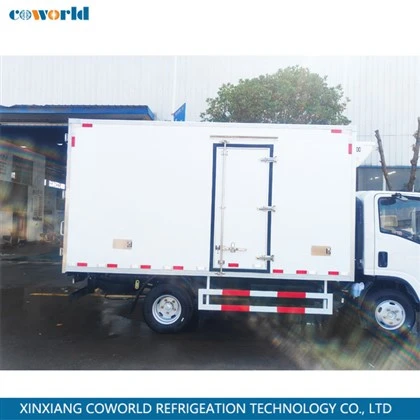
First, let’s get one thing straight: resetting a TRU isn’t the same as rebooting your home thermostat. It’s a structured process that prioritizes safety (for your drivers, your cargo, and the unit itself) and won’t wipe critical temperature logs or factory settings. Before you even touch the controls, there are two non-negotiable pre-checks to avoid mistakes that could turn a minor issue into a major one. First, pull over in a safe, level spot—never attempt resetting a TRU while driving, as sudden drops or spikes in temperature can spoil cargo, and you’ll need clear access to both the cab and the external unit housing. Second, confirm the root cause briefly to make resetting the right move. Most TRUs have fault codes displayed on the control panel; common ones like “E1” (low refrigerant pressure) or “E3” (sensor malfunction) often resolve with a reset, but if you see a “critical fault” code or a warning of a refrigerant leak, skip the reset and call a professional—refrigerant is toxic, and handling it without training is dangerous.
Now, let’s walk through the step-by-step reset process, tailored to the most common TRU models I supply (we work with both diesel-powered units for long-haul trucks and electric-powered units for urban delivery vans, and the steps are nearly identical for both).
Start with the cab interface: every modern TRU connects to the driver’s cab control panel, which is where you’ll initiate the reset. First, turn off the TRU completely—don’t just lower the temperature setting; use the dedicated “Power Off” button, hold it for 3 full seconds until the screen goes dark. This cuts power to the unit’s control module, which is how we clear stuck fault codes. Next, wait 2 full minutes. This isn’t a random timer—this gives the unit’s internal capacitors (small components that hold a charge) time to drain fully. If you skip this step, you might only do a soft reboot, which won’t clear stubborn fault codes. While you wait, take 10 seconds to check the temperature display on the panel: if it was reading 38°F for refrigerated cargo, note that number to confirm it matches after the reset.
Once those 2 minutes are up, restore power to the TRU. Press the “Power On” button, hold it for 1 second, and release—don’t hold it too long, or you’ll trigger a factory reset that will wipe all your temperature logs and custom settings. The control panel will light up, and you’ll see a sequence: first the unit model number, then a prompt to enter your access code (most TRUs use a 4-digit code set by the fleet manager, typically 0000 as a default). Enter the code, and you’ll see the main control screen, which shows current temperature, set temperature, and the unit’s status.
Now, the critical step: verify that the reset worked. First, check for fault codes. If the screen was showing an error before, it should now show “No Faults” or “System Normal” instead. Next, confirm the temperature is holding. For refrigerated cargo, you want it to stay between 34°F and 40°F; for frozen cargo, between -10°F and 0°F. If the temperature is 2-3°F off your set point, don’t panic—most TRUs take 5-10 minutes to stabilize after a reset. If it’s more than 5°F off, or if fault codes reappear within 10 minutes, that’s a sign there’s an underlying issue (like a dirty air filter or low refrigerant) and you’ll want to do a quick pre-check to troubleshoot before hitting the road.
Speaking of pre-checks after a reset, here’s a quick 1-minute scan you should do every time you reset a TRU: open the external access panel (usually on the side of the trailer, near the unit) to look for loose wiring, cracked hoses, or a build-up of ice on the evaporator coil. A clogged evaporator coil is one of the most common causes of TRU shutdowns, and if you clear it with a soft brush while you’re at it, you’ll reduce the chance of another reset a few hundred miles down the road.
Now, let’s cover the two most common reset mistakes I see fleets make, because these are the ones that lead to unnecessary breakdowns and spoiled cargo. The first mistake is resetting too quickly. I’ve had a fleet manager tell me he reset his TRU 10 times in a 100-mile stretch because the fault code kept coming back—turns out he was only waiting 10 seconds after cutting power, not 2 full minutes. That soft reboot never cleared the stuck code, so the unit shut itself off every time. The second mistake is using a full factory reset instead of a standard reset. Some fleets think “reset” means hitting the factory reset button, but that erases temperature logs required for food safety compliance (many regulators require 12 months of temperature data for perishable goods). It also means you have to re-program all your settings—temperature thresholds, alarm notifications, even the units for temperature (Fahrenheit or Celsius)—which adds 15-20 minutes to your time at the dock.
As a TRU supplier, I also want to share a few tips for preventing resets (and breakdowns) in the first place. First, change your air filter every 500 hours of operation—this is a simple $15 part that keeps air flowing through the unit, reducing strain on the compressor and preventing shutdowns. Second, check refrigerant levels every 3 months (or before a long haul) using a pressure gauge—low refrigerant is the #1 reason for fault codes that require a reset. Third, update your unit’s software annually. Most modern TRUs have over-the-air updates that fix common bugs that cause false fault codes, so you won’t have to reset as often.
Last month, a regional bakery I work with had a driver whose TRU shut off 20 miles from their delivery stop. The driver followed this reset process, got the unit back up and running in 5 minutes, and delivered 200 dozen croissants without any temperature issues. That’s the value of knowing how to reset a TRU correctly—it’s not just a technical task, it’s a way to protect your cargo, your revenue, and your reputation with your customers.
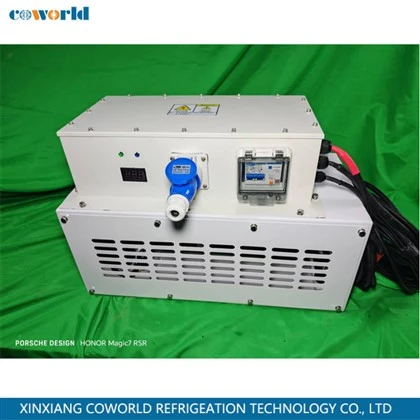
If you’re dealing with frequent TRU shutdowns, or if you need a new TRU that’s built for reliability on long hauls or tight urban routes, I’m here to help. We supply a range of TRUs that come with a 2-year warranty and free 24/7 technical support, so you’ll never be stuck without a plan when issues arise. Reach out to our team to discuss your specific fleet needs, and we’ll help you find the right unit and maintenance plan to keep your cargo safe and your operations running smoothly.
Refrigeration Unit References
- Transport Refrigeration Unit Maintenance Guide, North American Truck Equipment Association, 2022.
- Fault Code Resolution for Mobile Refrigeration Systems, Mobile Air Conditioning Society, 2023.
- Food Temperature Compliance Requirements for Transporation, U.S. Food and Drug Administration, 2022.
Xinxiang Coworld Refrigeration Technology Co., Ltd.
As one of the most professional refrigeration unit manufacturers and suppliers in China, our products have good reputation in the market. We warmly welcome you to buy cheap refrigeration unit for sale here from our factory. If you have any enquiry about cooperation, please feel free to email us.
Address: B103 ROOM, GT CITY, NO.199 ZHENGZHONG ROAD, HIGH TECH ZONE, XINXIANG CITY, HENAN PROVINCE, CHINA
E-mail: coworldfrio@hotmail.com
WebSite: https://www.coworldthermo.com/
